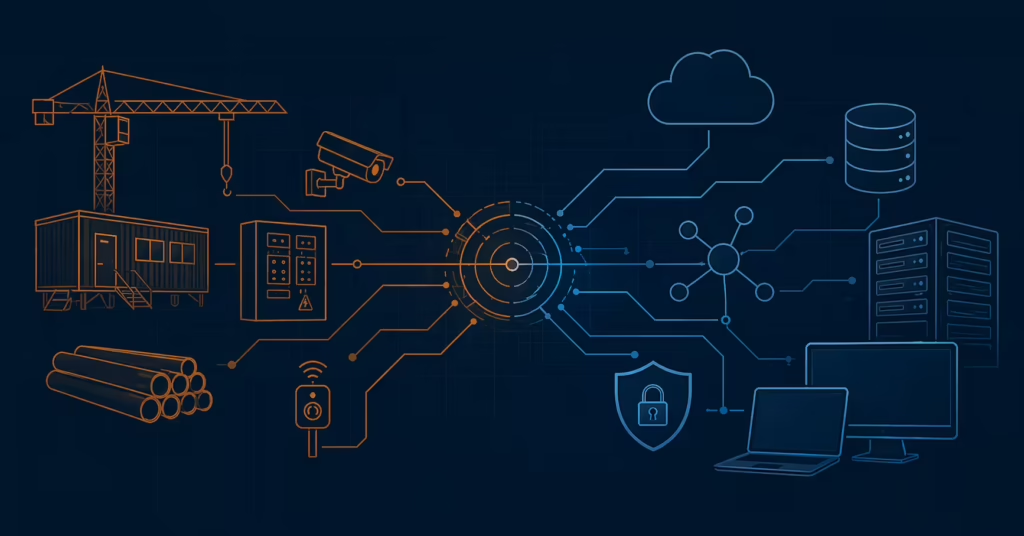
The modern job site is generating, transmitting, and acting on data continuously. IP cameras stream footage to cloud storage. Environmental sensors report air quality and temperature. Access control systems manage gate and entry point activity. Heavy equipment transmits telematics. Drones capture site progress and beam it to project management platforms. All of that activity is happening over network infrastructure, and in most cases, that infrastructure also connects back to the same environment that runs your project management software, your ERP, and your email. The convergence of operational technology (OT) and information technology (IT) is a documented risk class in industrial and manufacturing environments. It is now a construction reality as well, and most firms in the Greater Sacramento market have not yet addressed it.
What Is Actually Connected on a Modern Commercial Job Site
Connectivity on a construction site today extends far beyond email and scheduling. The devices deployed across modern projects are numerous, often interdependent, and frequently overlooked in security conversations because they were acquired by operations teams, not IT.
- IP-based surveillance cameras and video management systems
- Environmental monitoring sensors (temperature, air quality, noise)
- Electronic access control systems (gate readers, turnstile systems, badge readers)
- Connected heavy equipment with telematics (John Deere Operations Center, Caterpillar VisionLink, Komatsu Smart Construction)
- Drone control systems and data uplinks
- Temporary job site WiFi networks used by workers, subcontractors, and inspectors
- Building automation systems (BAS) in late-stage commercial construction
- Mobile devices running Procore, Autodesk Construction Cloud, and Bluebeam from the site
Each of these systems is connected to a network. In most construction environments, that network connects back to the office. The implications of that topology have not been systematically evaluated in most firms.
Why OT/IT Convergence Creates Risk
The technical reason convergence creates risk is straightforward: devices on one network can reach devices on another if the networks are not physically or logically separated. The operational reason is more significant: most job site devices were never designed to survive an attacker with access to them.
Most job site devices were designed for functionality, not security. IP cameras ship with default credentials that are rarely changed. Temporary WiFi routers are configured for convenience, not hardening. Building automation systems run on protocols (BACnet, Modbus) that predate modern security thinking by decades and were designed for closed-loop environments where every device on the network could be trusted.
The firmware on these devices is rarely patched. Camera manufacturers release security updates; most construction firms do not have a process for applying them. Building automation systems may not have automated update mechanisms at all. The result is a population of long-lived, rarely-updated network-connected devices with weak authentication sitting on the same network infrastructure as your business-critical systems.
When these devices share network infrastructure with systems that touch your back office (your project management platform, your file shares, your email) a compromise of a job site device can become a foothold into your corporate environment. The attacker doesn’t have to target your office network directly. They can target what they can reach: an unsecured camera, an exposed temporary router, or a connected piece of equipment with weak credentials.
“A compromised job site camera is not just a privacy problem. On a network that is not segmented, it is a potential entry point to your entire IT environment.”
The Attack Path From Job Site to Back Office
The risk becomes concrete when you walk through what an actual attack might look like. The path from a job site device to your corporate environment is shorter than you might think.
An attacker identifies a Sacramento-area GC with a large commercial project underway. Using publicly available information from the project website, social media, and permitting records, they identify the camera manufacturer being used on site. They scan for that manufacturer’s management interface on IP address ranges associated with the firm’s network. They find it exposed, with default credentials unchanged. They log in. From the camera’s management interface, they can see the local network segment and begin enumerating what else is on it. The job site network and the office network are not segmented, the firewall rule that was supposed to separate them was overridden during a site IT setup months ago and never restored. The attacker now has a foothold on the office network from which to move laterally, harvest credentials through network sniffing, and eventually reach the systems that actually matter: your email, your file server, your project management platform, and your ERP. The entire path took less than an hour, required no sophisticated tools, and exploited nothing that could not be fixed with basic configuration changes.
This scenario is not exotic or theoretical. Default credentials, unsegmented networks, and overlooked job site devices are among the most common findings in construction environment assessments. The firms that have been hit by ransomware often trace the attack back to exactly this pattern: a device that nobody was paying attention to, on a network that was not properly segregated, sitting between an attacker and the systems that matter.
What Network Segmentation Actually Looks Like in a Construction Context
Network segmentation is the antidote to this problem, but the term itself is often misunderstood. In practice, it means creating separate network segments for OT devices and IT systems, with firewall rules controlling exactly what communication is permitted between them.
Job site devices should be able to reach their management platforms (cloud video storage, equipment telematics services, drone flight control systems) without having any access to your internal IT network. A job site camera should be able to upload footage to AWS, but not to reach your file server. A piece of connected equipment should be able to transmit telematics to the manufacturer’s cloud platform, but not access your Procore instance. The firewall rules that enforce this are not complex, but they must exist and they must be documented.
Remote access from the job site to the corporate environment should flow only through a VPN with multi-factor authentication, not through an open tunnel or a shared WiFi password. The architecture should be documented in a way that reflects reality, not just what was planned during initial setup, but what is actually deployed. And when new devices are added to the environment, the segmentation architecture should be reviewed to ensure new devices are placed on the correct network segment and that existing rules still apply.
| Aspect | Unsegmented Network | Segmented Network |
|---|---|---|
| Job site and office network relationship | Shared / flat network segment | Separate VLANs with firewall rules |
| Job site device access to internal systems | Unrestricted | No direct access, outbound to cloud services only |
| Remote access to job site | Open tunnel or ad-hoc VPN | VPN-only with multi-factor authentication |
| Device credential management | Defaults retained or rarely changed | Changed on deployment and documented |
| Firmware updates | None or manual when discovered | Scheduled review process with vendor contact |
The Practical Question for Greater Sacramento Contractors
All of this is abstract until you ask yourself a specific question: If someone compromised a job site camera or a site WiFi router, could they reach your Procore environment, your file server, or your email? Most GCs who have not specifically addressed this question cannot confidently say no. And that is the problem.
Answering it requires a network architecture review, not a full security program, not a penetration test, just a clear-eyed look at how your job site connectivity is actually configured and whether the assumptions you made during deployment still hold. It requires knowing what devices are on your network, how they are connected, what they can reach, and what can reach them.
The firms with the highest risk are typically those that set up job site connectivity under time pressure during a project start, never documented how it was configured, and have accumulated devices and network changes without a systematic review. The project ended. The connectivity remained. No one owns it. No one has touched it since. And now it is a permanent part of your network.
What This Means for Sacramento-Area Construction Firms
OT/IT convergence is not a theoretical risk in commercial construction. It is an operational reality that most firms in this market have not formally addressed. The question is not whether your job site devices are connected to your network. They almost certainly are. The question is whether that connection is controlled or open.
Network segmentation is not a large or expensive undertaking for most construction firms. It typically requires configuration changes to existing network equipment and a clear policy for how new job site devices are provisioned. What it does require is someone to own the problem, to know what is on the network, how it is connected, and what the rules are.
If you cannot answer the question “what does our job site network connect to, and what can reach what,” that is the starting point.
Find Out How Your Job Site Network Is Actually Configured
We conduct network architecture reviews for Sacramento-area construction firms and can tell you exactly where your OT and IT environments are connected, and where they should not be.
Get Started