The construction software stack has matured rapidly over the last decade. Platforms that were niche tools ten years ago are now deeply embedded in how Sacramento-area general contractors and specialty contractors manage projects, finances, and field operations. That consolidation has also made the attack surface more predictable. Attackers who want to target a mid-sized California general contractor have a reasonable idea of what platforms they are running, what data those platforms hold, and what the common misconfiguration patterns look like. This post covers the specific risk profile of each major platform and the configuration gaps that firms most commonly get wrong.
Why These Platforms Are High-Value Targets
The core construction platforms hold everything that matters to a firm: project financials, subcontract values, labor and material costs, client and owner contact information, project schedules, change order history, bid history going back years, and payroll data tied to individuals. These are not operational systems that support business processes. They are the record of business itself. A general contractor’s Procore account contains every project, every client relationship, and every sub relationship, often going back ten years or more. Their Sage or Viewpoint system holds payroll, accounts payable, job costing, and in many cases direct integration with banking systems for ACH and wire transfers.
These platforms are designed for external collaboration, which means broad access is not a bug. It is a deliberate feature. Project managers need to grant visibility to subcontractors, to engineers, to owners, to inspectors. Field workers need mobile access. That openness and accessibility drive adoption and usability. It also expands the attack surface significantly: every external user provisioned on these platforms becomes another potential entry point for compromise.
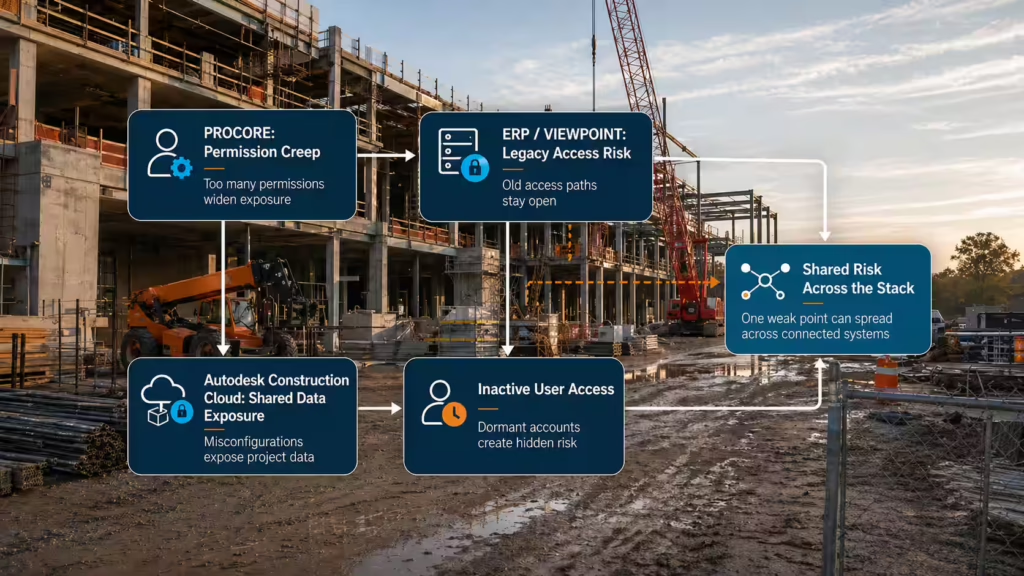
Integration multiplies the risk. Procore connects to estimating software, accounting systems, scheduling tools, CRM platforms, and mobile devices. Autodesk Construction Cloud connects to design software, field data collection apps, and accounting backends. Sage and Viewpoint integrate with banking platforms, payroll processors, and HR systems. Each integration is another pathway where a compromise in one system can propagate to another.
One compromised Procore account does not just expose one project. It exposes every project that account has been provisioned on, often going back years.
Procore: Where the Gaps Show Up
Procore’s permission structure is granular and intentionally flexible, allowing firms to configure access however they want. In practice, most firms deploy it with overly broad defaults. Subcontractors frequently get project-level access when they should have tool-level access limited to their own scope of work. A sub’s daily report tool should not include visibility to the project budget, change orders, or payment schedules. But in many installations, once a sub is assigned to a project, they see everything on that project.
The “Admin” role in Procore is a catch-all. Procore admins can see all projects in the account, all financial data, all users, all change orders, and all project communications. This role should be reserved for a small number of IT or operations staff who actually need to manage the system. Instead, it is frequently handed to project managers who need it for convenience, one account per PM that has everything, no permission boundaries.
Mobile access without mobile device management creates a unique vulnerability. Procore’s mobile app is widely used on job sites: foremen checking budgets, PMs reviewing daily reports, field workers accessing checklists. Without mobile device management (MDM) in place, a lost or stolen phone provides uncontrolled access to project data. A phone compromised by malware gives attackers live access to Procore’s project data. A phone obtained by a competitor gives them years of bid history and client relationships.
API integrations are frequently not audited. Procore’s open API is valuable. It allows tight integration with estimating tools, accounting systems, and scheduling software. But each integration should be reviewed: what data can the integration read from Procore, what can it write, what permissions does it have, and what happens if that third-party tool is compromised. Most firms set up these integrations and never review them again.
Inactive user accounts accumulate. Former employees, subcontractors from completed projects, and vendors who no longer work with the firm frequently retain active Procore access. A former PM who left two years ago may still have full visibility on all projects they ever touched. An inactive sub account still has access to all the project data from the original job. These accounts become both a liability (stale credentials are easier targets) and a risk (former employees with axes to grind have built-in access).
Autodesk Construction Cloud: BIM as a Security Surface
BIM models contain significant intellectual property. They hold design intent, structural engineering details, MEP routing and sizing, security system design, project schedule dependencies, and cost relationships. For facilities projects (hospitals, critical infrastructure, government buildings) BIM models can contain information about security systems, emergency access routes, and critical infrastructure details that have obvious sensitivity. That intellectual property belongs to the owner and the design team, but visibility often extends broadly through Autodesk Construction Cloud to the general contractor, subcontractors, and their field teams.
Autodesk’s platform history creates complexity. Autodesk Construction Cloud (ACC) spans multiple legacy products that have been consolidated or absorbed: BIM 360, PlanGrid (acquired 2020), and BuildingConnected. Many firms have projects across these different systems dating back years. Access controls from the legacy systems did not fully migrate. Current access may be duplicated or orphaned across platforms. Some users have visibility they should not have simply because they had it in the legacy system and it was never cleaned up during migration.
Admin accounts with global visibility are common, and multi-factor authentication is not always enforced at the admin level. This means a single compromised credential (phished password, credential stuffing, weak password) gives attackers full visibility across all projects, all models, all design data, and all project communications. Setting up MFA for external users is common practice. Setting it up for internal admins is far less common.
Model coordination data reveals far more than design details. It reveals project scope changes over time, trade coordination meetings and decisions, subcontractor relationships and scope boundaries, project delays and schedule impacts, and owner expectations about budget and timeline. This information is extremely valuable to competitors bidding against you on future work. For facilities projects, it can be valuable to threat actors gathering intelligence on critical infrastructure.
Sage 300 CRE and Viewpoint Vista: Where the Financial Risk Concentrates
Sage 300 Construction & Real Estate and Viewpoint Vista hold what matters most financially. Both systems manage payroll, subcontractor payment records, project cost codes, job cost data, accounts payable, and frequently integrate directly with banking platforms for ACH and wire transfers. A compromised Sage or Viewpoint environment does not just expose historical data. It can be used to authorize payments, modify vendor banking information, redirect payroll deposits, or fraudulently process change orders that inflate costs.
Both platforms frequently run on on-premise or hosted server infrastructure that receives patching less frequently than cloud-native software. If your Sage system is running on a server that your IT team manages, patch cycles may be monthly, quarterly, or worse. If a vulnerability is announced that affects that server infrastructure, the lag time between disclosure and patch can be weeks or months. During that window, the vulnerability is known and active exploits may be available.
Remote desktop access to these systems is common for accounting and finance staff who work off-site or from home. RDP (Remote Desktop Protocol) exposed to the internet (which is quite common) is one of the most exploited attack vectors in ransomware delivery and targeted breach attacks. Attackers scanning the internet for open RDP can find your Sage or Viewpoint server, attempt credentials, and gain direct administrative access to your financial systems in minutes.
Banking integration creates direct financial risk. Many firms configure Sage or Viewpoint to process ACH transfers and wire transfers directly from the system. If attackers gain access to these systems, they do not just have visibility into financial data. They have the ability to initiate payment transactions. A compromised Sage system can be used to wire $100,000 to an attacker-controlled account with nothing more than access to the user interface, no separate approval, no secondary system, no friction.
The Configurations Most Firms Get Wrong
| Control Area | Common Configuration | Secure Configuration |
|---|---|---|
| Procore permission scope | Subcontractors and external users get project-wide access; PMs get Admin role for convenience | Permissions role and tool-limited; subs get visibility only to their scope; PMs use role-based access, not Admin |
| MFA enforcement | MFA required only for external users; internal staff bypass it for convenience | MFA required for all users including admins; no exceptions |
| ERP (Sage/Viewpoint) remote access | RDP open to the internet; single-factor authentication; accounting staff use shared accounts | RDP gated behind VPN with MFA; individual user accounts with audit logging |
| API integrations | Set up once and never reviewed; permissions are broadly read/write; no token rotation | Scoped to only needed functions; reviewed annually; tokens rotated on a schedule |
| User lifecycle | Manual and inconsistent; former employees retain access; inactive accounts accumulate | Systematic provisioning and de-provisioning; account access removed within 24 hours of separation |
| Audit logging | Not enabled; no visibility into who accessed what and when | Audit logging enabled; logs reviewed regularly; alerts configured for sensitive actions |
| Single sign-on | Not implemented; separate credentials per platform; no centralized management | SSO enabled where supported; centralized identity provider; conditional access based on risk |
- MFA not enforced for external and subcontractor users in Procore or Autodesk Construction Cloud
- Admin-level accounts used for routine project management tasks instead of role-based access
- RDP for ERP access open to the internet rather than VPN-gated with multi-factor authentication
- API integrations with excessive read and write permissions that were never reviewed after initial setup
- Inactive user accounts from completed projects and former employees that were never de-provisioned
- Audit logging disabled or not reviewed, no visibility into who accessed what data and when
- Single sign-on not implemented where supported, resulting in separate credentials per platform with no centralized identity management
What This Means for Greater Sacramento Construction Firms
The platforms your firm runs are not unique to you. Attackers have mapped them. They know Procore’s permission structure. They know Autodesk Construction Cloud’s access patterns. They know that RDP is often the remote access mechanism for Sage and Viewpoint. What is unique to your firm is how you have configured those platforms and whether those configurations reflect a deliberate security posture or accumulated convenience decisions made by people managing busy projects.
A platform security review is not a complex undertaking. It starts with an inventory of who has access to what, what specific permission levels they have, how remote access is controlled, what integrations exist, whether audit logging is enabled, and whether credentials are actively managed when people leave the firm. Most firms that conduct this review find accounts that should not exist, permissions that are broader than required, and integrations that were set up years ago and never audited again.
The question is not whether these platforms are secure in theory. Every one of them supports secure configurations. The question is whether your specific configuration of these platforms reflects how they are actually being used, and whether the access you have provisioned is exactly the access you intended to provide, not more.
Review Your Construction Platform Security Posture
We work with Procore, Autodesk Construction Cloud, Sage, and Viewpoint environments regularly. If you want to know where your specific configuration creates exposure, contact us.
Contact VQIS